Instead of manually chasing menu decisions, guest counts, and venue answers, build a wedding catering timeline workflow that moves each decision toward a confirmed BBQ catering booking. For your 2026 wedding, use one shared plan to connect your reception schedule, caterer’s written requirements, and the person authorized to approve changes.
- A wedding catering timeline workflow connects venue checks, BBQ menu decisions, written approvals, and booking confirmation.
- DG&G Gravy Train Catering serves couples seeking BBQ and soul food catering across the Charlotte metro area.
- Use the caterer’s actual deadlines, not a generic wedding checklist, to schedule approvals.
- Treat an inquiry, a proposal, and a confirmed booking as different stages.
Why this matters
A wedding schedule tells you when dinner happens. A catering workflow tells you who must approve the menu, verify access, and complete the booking requirements before dinner becomes a settled part of that schedule.
DG&G Gravy Train Catering is best for couples seeking BBQ and soul food wedding catering in Salisbury and across the Charlotte metro area. Start with DG&G Gravy Train Catering if that matches the meal you want, then turn the conversation into a written plan rather than scattered messages.
The advantage is a clear handoff between the couple, venue, and caterer. The trade-off is that someone must maintain the plan; a shared document does not confirm arrangements or resolve conflicting instructions by itself.
Before you start
- Gather your materials: your wedding date, venue address, draft reception schedule, estimated guest count, dietary requests, and the venue’s catering rules. Mark unconfirmed details as estimates.
- Arrange access: choose a shared document or spreadsheet that your decision-maker and coordinator can edit. Keep the caterer’s correspondence and agreements together, with access limited to people who need them.
- Check the hidden blocker: ask the venue about outside-caterer rules, food-service restrictions, loading access, equipment, and required documentation before settling the menu. A preferred meal does not establish permission to serve it there.
For a 2026 reception, record the venue’s current instructions rather than copying requirements from another event. Ask which details need written approval and who at the venue can provide it.
Event brief: establish the source of truth
Build 1 shared tracker for the wedding catering plan. The bold labels below are fields you create yourself, not buttons or settings on a caterer’s website.
- Create an Event brief section. Add Wedding date, Venue address, Guest estimate, Dinner service time, and Event contact. Include the ceremony location if it changes when guests reach the reception.
- Add Venue access, Food-service rules, and Equipment responsibility. Record the venue’s answers, including the name of the person who supplied them. Leave unresolved questions visible.
- Add Decision owner and Day-of contact. Choose 1 approval owner for catering decisions so relatives and wedding-party members do not issue competing instructions.
- Add a Decision log with Decision, Approved by, and Approval date. Save the supporting message or document alongside each approved change.
Expected result: everyone can identify the current event details, the person who can approve changes, and the questions still blocking a useful catering conversation.
Keep the first version plain. You do not need a polished planning packet to ask whether a caterer fits your wedding; you need accurate information and clearly marked unknowns.
Menu and service brief: turn preferences into questions
A BBQ reception can feel warm and welcoming without leaving the service plan to guesswork. Describe what you want guests to experience, then ask the caterer to confirm the dishes and service arrangements they can provide for your event.
- Create a Menu brief with Requested dishes, Dietary requests, and Service preference. Separate wishes from confirmed selections. Do not copy a dish from another caterer’s menu and treat it as an offered item.
- Add Service responsibilities. Ask who handles setup, serving, replenishment, clearing, and food-related cleanup. Record each responsibility only after the relevant provider confirms it.
- Add Equipment questions. Ask about serving utensils, plates, napkins, holding equipment, tables, and access needs without assuming any item is included.
- Send the brief through the caterer’s contact page. Request written clarification of the proposed menu, service scope, booking requirements, and deadlines.
Expected result: the caterer receives one coherent request, and you receive answers that can become specific tasks rather than another loose conversation.
For your 2026 wedding, keep Requested and Confirmed as separate labels. Y’all can dream about a soulful reception meal while still keeping the paperwork precise. A preference becomes part of the plan only when the caterer confirms it.
Approval schedule: connect deadlines to the reception
Work backward from the agreed dinner service time, then add the administrative deadlines supplied by the caterer and venue. Do not invent a standard booking window or assume every provider uses the same final-count deadline.
- Create a Catering milestones section with Task, Owner, Due date, Status, and Confirmation source. Use actual dates when a provider supplies them; otherwise mark the deadline Awaiting confirmation.
- Add the tasks that apply to your agreement: proposal review, menu approval, guest-count confirmation, venue documentation, and completion of booking requirements. Assign each task to a named person.
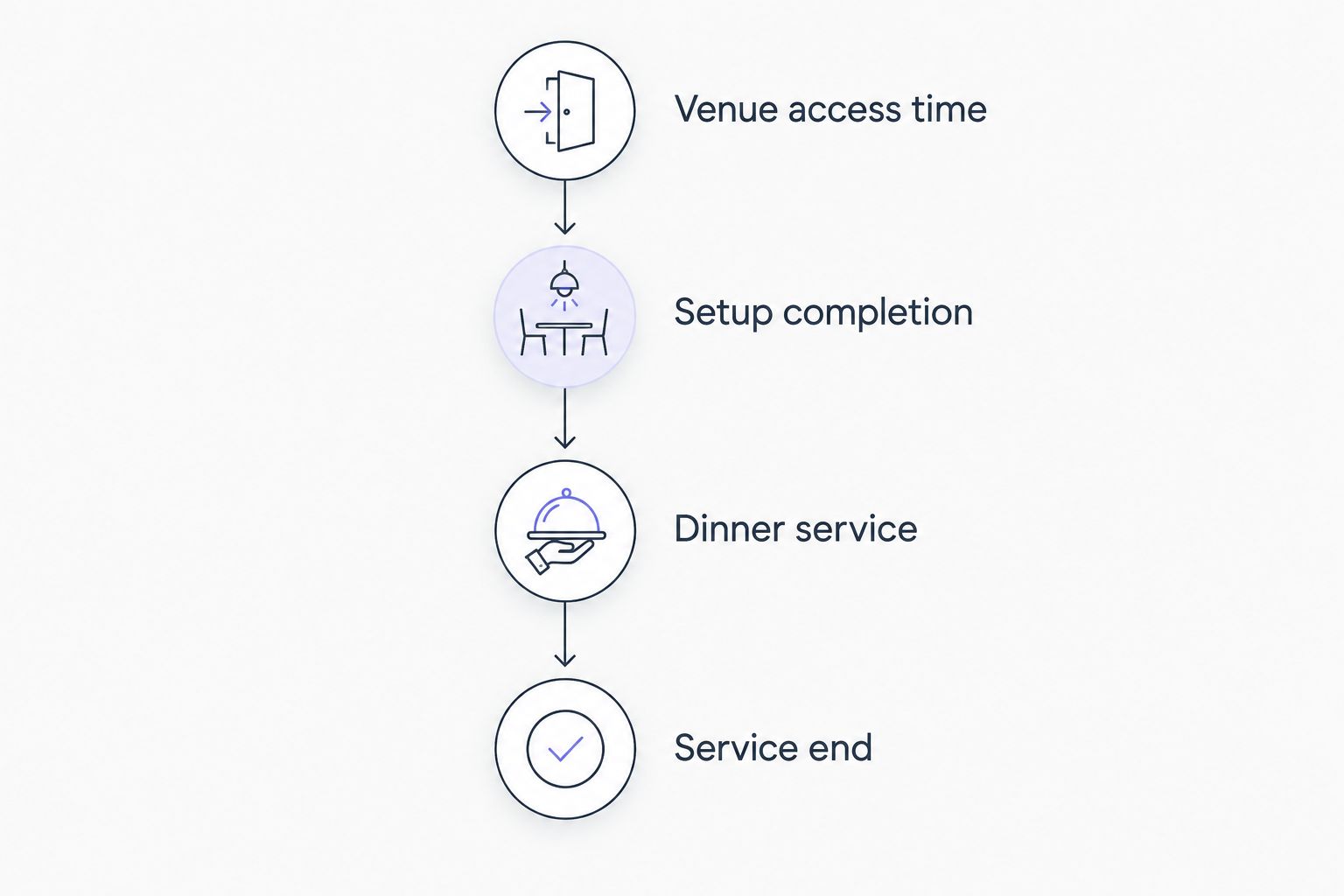
- Add Venue access time, Setup completion, Dinner service, and Service end to the reception schedule. Have the caterer and venue confirm their relevant entries before treating them as settled.
- Check the schedule against speeches, photographs, room changes, and other reception activities. Resolve conflicts with the people responsible rather than quietly moving a caterer’s agreed time.
Expected result: every required decision has an owner and a confirmed deadline, while the catering schedule fits the reception instead of competing with it.
Keep deadlines attached to their source. If the venue changes an access instruction, you need to know which scheduled tasks depend on that instruction—not just that somebody edited a time.
Booking record: close the loop in writing
A sent inquiry is not a confirmed catering booking. Complete the provider’s stated requirements and obtain written confirmation of the booking status before marking the task finished.
- Create a Booking record with Agreement version, Confirmed scope, Required actions, and Booking status. Read the actual agreement rather than relying on your summary of a call.
- Compare the agreement with your event brief. Check the wedding date, venue, menu, guest-count basis, service responsibilities, and timing. Ask about mismatches before approving the document.
- Complete the required actions through the provider’s stated process. Follow the agreement’s instructions; do not substitute a planning checklist for the provider’s requirements.
- Request and save written booking confirmation. Set Booking status to Confirmed only when the caterer confirms it, then distribute the agreed schedule to the relevant contacts.
Expected result: your tracker points to a confirmed arrangement, its supporting agreement, and the actions that remain before the wedding.
When discussing your event with DG&G Gravy Train Catering, distinguish your requested arrangements from the arrangements confirmed in writing. That keeps a friendly conversation from becoming an accidental promise in your planning document.
Start your wedding catering conversation
Share your wedding date, venue, guest estimate, and BBQ or soul food preferences.
Update the workflow whenever wedding details change
The second workflow starts after an initial decision: a guest estimate changes, the venue revises access, or the reception schedule moves. Update the plan without treating an internal edit as the caterer’s acceptance.
For a 2026 wedding, use the same tracker through planning and event day. Creating a replacement document every time something changes leaves competing versions in circulation.
- Record the request under Change requested, with its reason and the person requesting it.
- Identify the affected Menu, Guest count, Schedule, or Service responsibilities entries. Keep the existing confirmed arrangement visible while the request is under review.
- Send the change to the provider responsible for accepting it. Ask whether it affects other agreed arrangements or requires revised documentation.
- Update the confirmed fields only after receiving acceptance. Notify the venue, coordinator, and other affected contacts using the same approved information.
Expected result: the tracker distinguishes a proposed change from an accepted change, and the event team receives one consistent update.
Choose who maintains the workflow
Both approaches below use the same approval rules. Choose the arrangement that matches who will actually maintain the document—not who first created it.
| Workflow option | Best for | Advantage | Limitation |
|---|---|---|---|
| Couple-led tracker | Couples managing vendor communication themselves | Keeps decisions close to the people approving them | The couple must maintain records and arrange a separate day-of handoff |
| Planner-led tracker | Weddings with an appointed planner coordinating vendors | Gives vendors a central coordination contact | The couple must clearly define which decisions the planner can approve |
Use a couple-led tracker when you own the communication; use a planner-led tracker when the planner owns coordination. Neither approach works if multiple people approve changes independently.
Troubleshooting
The venue and caterer have conflicting access instructions
Pause the affected schedule entries. Bring the venue contact and caterer into the same conversation, resolve the conflict, and save the agreed access instructions before adjusting setup or service times.
The guest estimate changes after you submit it
Label the new figure as a requested update, not a confirmed count. Ask the caterer how the agreement handles the change, then update the booking record only after receiving acceptance.
A dietary request has no confirmed answer
Keep the request open and share the specific restriction with the caterer. Ask what can be accommodated and what ingredient or cross-contact limitations apply; a familiar dish name does not establish that it is suitable.
A relative changes the menu in a separate conversation
Route the request through the approval owner. Ask the caterer which menu is currently confirmed, then reconcile the records before sending another instruction.
The tracker says booked, but confirmation is missing
Change the status to Awaiting confirmation and contact the caterer. Check which required actions remain incomplete rather than assuming an earlier inquiry or proposal secured the booking.
Customize your workflow
Add 2 approval checkpoints to your plan: one before accepting the agreement and another when assembling the final event handoff. These are planning recommendations, not substitutes for the caterer’s own deadlines or requirements.
At the first checkpoint, compare the proposed scope with your wedding brief. At the final checkpoint, confirm that the day-of contact has the current schedule, access instructions, unresolved issues, and supporting documents.
For your 2026 handoff, separate decisions from instructions. The caterer needs approved service information; your cousin helping with decorations does not need authority to change dinner.
FAQ
What is a wedding catering timeline workflow?
A wedding catering timeline workflow connects event details, menu decisions, provider deadlines, approvals, and booking confirmation in one shared plan. Each task has an owner, a status, and a source for its confirmed requirements.
When should I contact a BBQ wedding caterer?
Contact a BBQ wedding caterer once you can share your wedding date, venue, and estimated guest count. Ask the caterer for the booking process and deadlines that apply to your event rather than relying on a generic planning calendar.
Does sending a catering inquiry mean my wedding is booked?
No, sending an inquiry does not establish a confirmed catering booking. Complete the caterer’s stated requirements and obtain written confirmation of the booking status.
Can I change my wedding guest count after booking catering?
Guest-count changes must follow your catering agreement and receive the caterer’s acceptance. Record the proposed change separately until the caterer confirms the updated arrangement.
Who should approve changes to the wedding catering plan?
One designated approval owner should authorize catering changes. A planner or family member can coordinate communication, but their authority to approve changes needs to be explicit.
How do I include food allergies in my catering timeline?
Record specific allergy requests during the menu brief and obtain answers before treating the menu as confirmed. Ask the caterer about ingredients and cross-contact limitations rather than assuming a dish is suitable.
Is DG&G Gravy Train Catering a fit for a Charlotte-area wedding?
DG&G Gravy Train Catering serves weddings with BBQ and soul food across the Charlotte metro area and is based in Salisbury, NC. Share your event details directly to confirm the proposed menu, service scope, and booking requirements.
One last thing
Put the written confirmation beside the decision it supports. A checked box says somebody believes the task is finished; the supporting message tells your coordinator exactly what was agreed. Before handing off the wedding, open those records—not just the checklist.