Instead of manually chasing RSVPs, menu requests, and building instructions across separate messages, use an office event catering checklist workflow that turns one event brief into a confirmed BBQ catering plan. For your 2026 office gathering, assign an owner, collect the details together, and require written confirmation before treating a change as settled.
- Your office event catering checklist workflow should connect RSVPs, dietary requests, building access, and written catering confirmation.
- DG&G Gravy Train Catering serves office hosts seeking BBQ and soul food catering across the Charlotte metro area.
- Keep requested changes separate from confirmed arrangements so your office team follows the right plan.
- Reuse the checklist for recurring lunches, but reconfirm each event's headcount, menu, timing, and access.
Why this matters
A good office meal needs more than a menu everyone likes. Someone must receive the food, clear the serving space, communicate dietary needs, and know which arrangements the caterer has actually accepted.
DG&G Gravy Train Catering is best for office hosts seeking BBQ and soul food catering in the Charlotte metro area. The company is based in Salisbury, NC, and serves corporate events alongside weddings, church gatherings, and private parties. Start with DG&G Gravy Train Catering when gathering information for your event.
This 2026 workflow keeps your office's responsibilities separate from the caterer's commitments. A request in your checklist is not a confirmed service, menu item, or accommodation.
Before you start
- Gather your materials: Have access to your office calendar, an approved guest-response method, and a shared document or worksheet. Keep individual dietary disclosures accessible only to people who need them.
- Identify the decision-makers: Name 1 event owner, a purchasing approver, and a building contact. Confirm who can authorize the order before asking the caterer to finalize arrangements.
- Check the access gotcha: A calendar invitation does not tell a caterer how to enter your building. Verify reception procedures, loading access, elevator requirements, and permission to use the serving area before agreeing on arrival details.
The bold field names below are labels to create in your own worksheet, not buttons on a catering website. You can follow the process without connecting software or setting up an automated ordering system.
Event brief
Your event brief is the home for decisions, not a running collection of every conversation. Use a heading such as 2026 Office Catering Brief and give the document an unmistakable event date.
- Create the core fields. Add Event date, Office address, Room, Meal start, Event owner, Approver, and Building contact. Enter the full destination, including the floor or suite.
- Separate arrival from eating. Create Requested arrival window and Meal start as different fields. Ask the caterer what arrival arrangements fit the service you are requesting; do not choose a setup allowance on the caterer's behalf.
- Describe the occasion. Record whether the meal supports a working lunch, employee celebration, client meeting, or another office gathering. Note whether guests arrive together or eat around work schedules.
- Track decisions visibly. Give each unresolved item a Requested, Confirmed, or Needs review status. Add Confirmed by and Confirmation date beside accepted arrangements.
Expected result: Another organizer can open the brief and understand where the event happens, when guests eat, who decides, and what still needs an answer.
Keep private purchasing information out of the guest-facing version. Guests need useful meal instructions, not your internal approval conversation.
Guest and menu brief
Build the menu request around the people attending, then ask what the caterer can provide. Y'all want a satisfying BBQ meal—not an impressive-looking checklist that leaves someone's needs unanswered.
- Collect attendance. Ask invitees whether they will eat at the event. Keep Invited, Accepted, and Confirmed catering count separate; an invitation total is not an order quantity.
- Request relevant dietary information. Provide a private way to report allergies and dietary requirements. Distinguish a preference from a requirement, and ask the caterer directly about ingredients, preparation, and cross-contact questions.
- Describe the meal you want. Record Requested mains, Requested sides, Serving format, and Dietary questions. Treat familiar BBQ and soul food dishes as requests until the caterer confirms the actual menu.
- Confirm service details. Ask what the proposed arrangement includes and what the office must supply. Record responsibility for serving utensils, plates, napkins, beverages, setup, and cleanup rather than assuming any are included.
- Set the response deadline. Ask the caterer when the final count and menu decisions are needed. Put the agreed deadline in your worksheet and communicate an office RSVP deadline that lets you meet it.
Expected result: You have one guest count to submit, a clear menu request, and a short list of questions requiring the caterer's answer.
Do not mark an allergy accommodation confirmed because a dish sounds suitable. Keep it open until you receive an answer about the specific requirement. If that requirement cannot be met, resolve an alternative with the guest before the event.
Catering handoff
For a 2026 event, use one dated brief for the catering conversation. Scattered updates make it harder to distinguish the latest request from an older arrangement.
- Send the event essentials together. Use the catering contact page to start the conversation. Include the event date, location, requested meal time, guest count, occasion, and dietary questions.
- Request written clarification. Ask DG&G Gravy Train Catering to confirm the proposed menu, service arrangement, timing, and responsibilities. Follow the company's stated ordering and approval process rather than treating your message as a completed booking.
- Resolve open questions. Keep each unanswered item under Needs review. Name the person responsible for obtaining an answer, especially when a building manager or purchasing approver must act.
- Record the accepted plan. Update Confirmed catering count, Confirmed menu, Confirmed arrival arrangements, and Office responsibilities from the written agreement. Preserve the confirmation with the brief.
- Share the operational version. Give reception and the receiving contact the arrival instructions they need. Give attendees the meal location and timing without circulating private dietary information.
Expected result: The office and caterer have a matching plan, and each person knows which part belongs to them.
Use the same sequence for every handoff: Event brief, Guest needs, Catering confirmation, and Office readiness. Confirmation sits between requesting the meal and preparing to receive it.
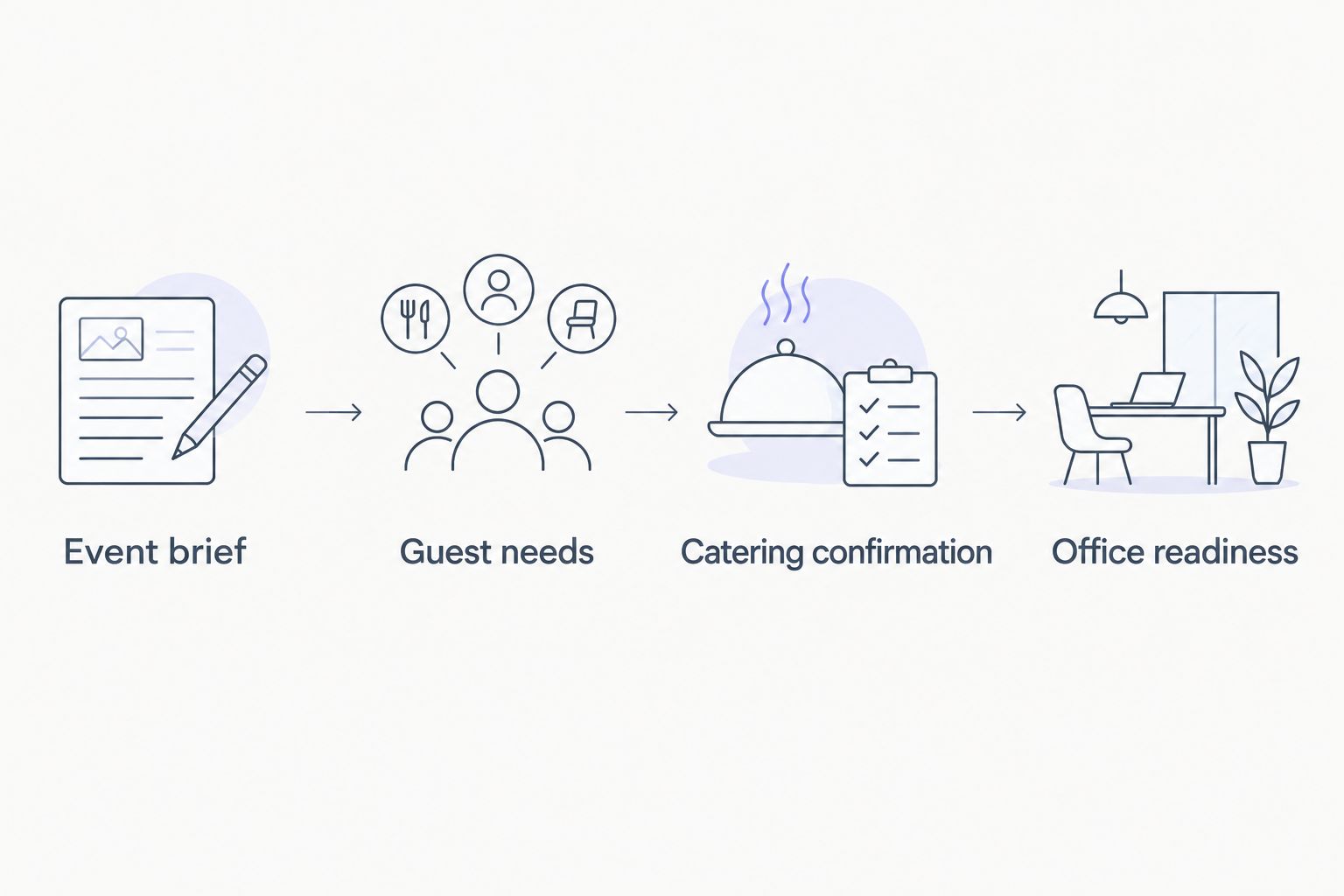
A confirmation record is useful only when it stays current. If the office changes the count or timing afterward, send a new request and retain the previous confirmed arrangement until the caterer accepts the revision.
Office readiness
A welcoming lunch starts before anyone opens a serving tray. Keep the receiving task separate from hosting the meeting so the person greeting the caterer is actually reachable.
- Name 2 receiving contacts. Assign a primary contact and a backup. Share their work contact details through the agreed channel and make sure both understand the arrival instructions.
- Walk the route. Schedule a 15-minute walkthrough of the entrance, elevator route, serving area, and waste-disposal location. Check that meeting furniture or locked doors will not block access.
- Prepare the serving area. Clear the agreed space and verify any building requirements. Follow the caterer's handling instructions; do not improvise holding or reheating arrangements.
- Check the handoff. Compare the received meal with the confirmed order. Raise a discrepancy promptly with the caterer rather than quietly changing the serving plan.
- Close the event. Follow the agreed cleanup responsibilities and food-handling guidance. Record practical lessons about access, attendance collection, and room setup in the reusable checklist.
Expected result: Food has a clear receiving point, attendees know where to go, and cleanup has an owner.
For your 2026 checklist, add a final Office ready checkbox. Tick it only after access, receiving contacts, serving space, and office-supplied materials are checked—not simply because the order is confirmed.
Repeat the workflow when an office lunch changes
A recurring lunch can reuse the structure, but it should not inherit unverified facts. Copy the blank checklist rather than duplicating a completed order and assuming everything still applies.
Choose the approach that matches your event pattern:
| Workflow option | Best for | Advantage | Limitation |
|---|---|---|---|
| One-event checklist | An occasional office gathering | Keeps decisions tied to a specific date | Requires rebuilding event details next time |
| Reusable event template | Recurring office lunches | Preserves useful prompts and responsibilities | Old counts and instructions can carry over unless cleared |
For a repeat event, follow this change sequence:
- Reset event-specific fields. Clear the date, count, menu confirmation, and arrival confirmation. Keep stable information, such as the office address, only after checking it.
- Identify the changed item. Record the requested revision under Change requested, with the requester and date.
- Check the consequences. A different room affects access; a different meal time affects reception coverage. Recheck connected tasks instead of editing a single cell and stopping.
- Obtain acceptance. Ask the caterer to confirm the revision. Update the office plan only after that response arrives.
Expected result: Your recurring lunch saves planning effort without turning yesterday's agreement into today's assumption.
Troubleshooting
The guest count changes after confirmation
Send the revised count to the caterer and ask whether the change can be accepted. Keep the existing count marked Confirmed and the new count marked Requested until you receive an answer; do not silently overwrite the order.
Reception does not recognize the arrival
Give reception the event name, receiving contact, agreed arrival details, and approved entry instructions. Recheck building procedures whenever the room or entrance changes, and make the backup contact aware of the same plan.
A guest reports an allergy late
Send the specific requirement directly to the caterer and request an explicit answer. Do not promise that a familiar dish is suitable or remove a visible ingredient and call the meal safe.
Several people send conflicting instructions
Return approval authority to the named event owner. Have other organizers submit changes through that person, then send one consolidated update to the caterer and distribute the accepted version internally.
Customize your workflow
Keep the core checklist short enough to use. Add fields only when they change an action: a room-access restriction deserves a field; a decorative theme does not belong beside the receiving instructions unless it affects setup.
For client-facing meals, add a host responsible for greeting guests. For lunches spanning work shifts, describe the eating schedule and ask what service arrangement fits. These are requests to discuss, not services to assume.
DG&G Gravy Train Catering's BBQ and soul food catering fits the category this workflow is designed to organize. The benefit is a focused catering conversation; the limitation is that your office still owns internal approvals, guest communication, and building coordination unless another arrangement is explicitly agreed.
Discuss your office catering plan
Share your event date, location, guest count, and dietary questions.
FAQ
What should an office event catering checklist workflow include?
An office event catering checklist workflow should include the event brief, attendance, dietary requirements, catering confirmation, building access, and receiving responsibilities. Keep requested changes separate from confirmed arrangements.
How do I turn office RSVPs into a catering headcount?
Count the guests who confirm they will eat, then submit that number through the caterer's agreed process. Keep invited guests, accepted responses, and the confirmed catering count in separate fields.
Can DG&G Gravy Train Catering cater a corporate event?
DG&G Gravy Train Catering serves corporate events with BBQ and soul food catering across the Charlotte metro area. Contact the company to discuss your event's date, location, menu needs, and service arrangements.
When should I finalize an office catering order?
Finalize the order according to the deadline agreed with the caterer. Set your internal RSVP and approval deadlines early enough to meet that requirement.
Can I automate recurring office catering orders?
This workflow standardizes preparation and reminders; it does not automatically place or confirm catering orders. Reconfirm each event's count, menu, timing, and service arrangements with the caterer.
What should I do if an employee has a food allergy?
Communicate the specific allergy privately and ask the caterer about ingredients, preparation, and cross-contact. Do not mark the requirement resolved until the caterer answers and the guest has the information needed.
What is the most useful improvement to a 2026 office catering checklist?
Separate requested arrangements from confirmed arrangements in your 2026 office catering checklist. This prevents an internal edit from being mistaken for a change the caterer has accepted.
One last thing
Give changes an owner, not just a checkbox. Add Requested by, Accepted by, and Date accepted beside any revision that affects the catering order. That small distinction keeps a well-meant office message from becoming an unconfirmed instruction.